How
to use the Alerts
So
you have made it this far. Congratulations! The
alerts are designed as a tool providing you the
trader with an additional resource for trading information.
Use the PremiereTrade FOREX Alerts along with proper
money management and other trading tools such as
4xmadeeasy software.
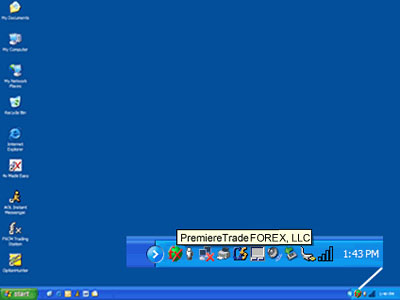
Alerts
are sent out via the PremiereTrade FOREX Instant
Alerts Messenger, which runs in the toolbar tray
on your computer
The
Basics – What is a Radar?
When
you see that a RADAR is issued, this means that
our trading team has identified a possible trading
opportunity. It may take some time for this trade
to develop and because of this fact we have specific
times in place for a Radar to remain valid.
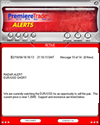 |
Active
Trade Radar – Valid for 3 hours |
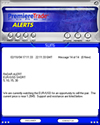 |
Swing
Trade Radar – Valid for 1 day |
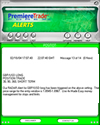 |
Position
Trade Radar – Valid for 3 days |
Radars are valid for a specific period of time
When
is an ALERT issued?
An
ALERT is issued when the trading
team has entered a trade.
Remember
that issued ALERTS are in no way a recommendation.
They give you the opportunity to see how our trading
team is trading the market.
Please
understand clearly, if you decide to make
a similar trade, you must still complete your own
market analysis to make sure that this trade will
meet your personal financial goals and to always
use proper money management. This cannot be stressed
enough and it will serve you well in the future
to follow this advice.
We
always trade with Stop Loss Orders to Protect our
Accounts
How
should I use the Alerts then? Use the alerts
as another trading tool along with 4xmadeeasy, other
types of software, charting and news reports. The
Alerts are designed to be a very strong additional
tool for trading the FOREX market. Use the Alerts
as educational tools to help in learning how to
trade currency.
Benefit
from our team of traders which monitors the 12 major
currency pairs, 24 hours a day looking for trading
opportunities...
Exit
strategies
Listed
in this section are different strategies for Entering
and Exiting Trades.
Warning!
All financial markets pose inherent risk, past trading
profits are not indicative to future results, unique
experiences may differ, results may vary and trading
in the FOREX market involves risk.
Strategy
1 – Money Management – Are you are a
4xmadeeasy user? Use the Money Management
Tab in 4xmadeeasy to determine the correct stop
loss and limit orders. HINT: Make sure that the
timeframe is accurate to the style of trading that
you are looking to trade on: Active 30 min, Swing
180 min and Position Day.
Strategy 2 - Close out when Profitable -
Take your profits when you are in the positive.
This is commonly known as super active trading.
A typical amount for this type of quick closing
could be as little as 10-50 pips.
Strategy
3 - Move your stop to break even -
Using proper money management stops and limits are
set. When the trade goes into positive by 40-80pips,
the stop loss is moved to breakeven or +5, this
way the trade is able to continue running. Close
the trade as per your trading objectives or Money
Management calculations. The major benefit of this
strategy is that once your trade is above breakeven,
you can trade with no risk to your own capital.
This is similar to Strategy 3 below.
Strategy
4 – Swing/Trail your stops -
The next strategy is to trail our stop when we near
our trading objective. For example: If we set a
goal to make 75-100 pips on a trade, at +40, raise
the stop loss order to breakeven or +5. This allows
up to trade in a risk free environment. As the trade
increases, continue to raise the stop loss. As you
near your exit target (goal), tighten the stop further.
You protect yourself from sharp changes direction
(reversals) and allow for maximum gains by letting
the trade run.
Strategy 5 – Position Entry/Exit
- Please be aware that this is an advanced
strategy and should be tested first in a demo if
you do not feel comfortable. This strategy is designed
for 360 minute and higher timeframes. Enter your
trade with 2 positions (This can be 2,4,6,8,10 lots)
Take profits on the first position by setting an
entry order (limit order) in the opposite direction
at the same number of pips as your stop loss order.
Hint: If you are selling, set the entry to buy
one position, if you are buying set the entry order
to sell one position. When your first position
is limited out, move the stop on your second position
to breakeven and trail the stop loss order by 40-50pips
until your last position gets stopped out. This
will allow your trade to run to full potential,
while locking in potential profits as they develop.
It is also important to remember that this type
of trade should be expected to run for 5-14 days.
Stop loss orders should be set using the last relevant
highs/lows or longer term money management settings.
It is also important to remember that longer term
trades can create higher than usual levels strain
on small amounts of capital. This is due to the
larger amount of market fluctuation which must be
handled when playing the market in longer timeframes.
*Using
a demo account is a good idea if you are trying
a new or untested strategy.
Alert
Profit & Loss (P/L)
A Profit and Loss statement is generated for every
position our in house traders have entered and then
closed.



